Built to get your iCloud Photos library out — completely

A focused desktop app that does one job well — moving your photos and videos from iCloud to storage you own.
200 free files every month No credit card required v0.1.0 · What's new
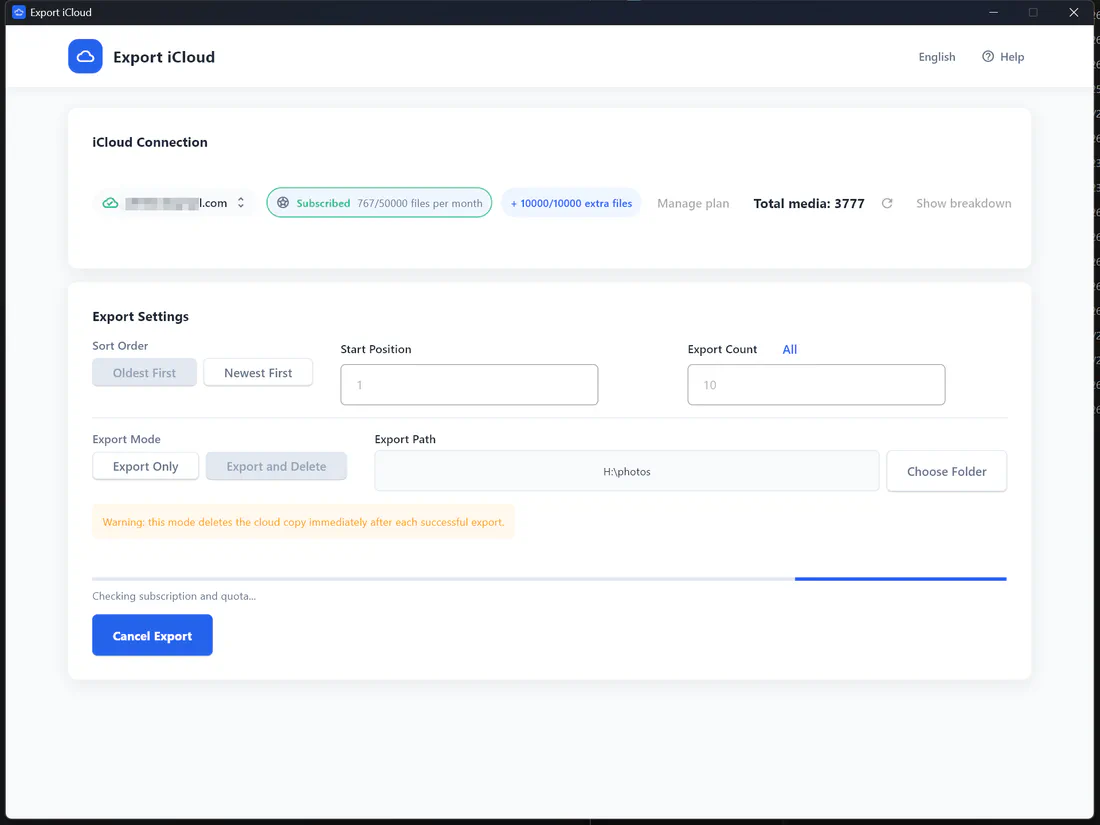
Export iCloud export settings screen

What Export iCloud does

Export iCloud connects to your iCloud Photos library with your Apple ID and downloads every photo and video as the original file to a folder you choose — on your computer, an external hard drive, or a network share. It runs on Windows 10/11 and macOS.

What makes it different

  • No 1,000-item limit. iCloud.com only lets you select up to 1,000 items at a time. Export iCloud works through your whole library in one run. See the comparison →
  • No full sync required. iCloud for Windows and the Mac Photos app want to sync your library first. Export iCloud downloads directly from iCloud to the folder you pick. See the comparison →
  • Export and Delete. Optionally remove each item from iCloud right after it is saved, to free up iCloud storage without manual cleanup.
  • Resumable batches. Set a start position and export count to split a 50,000-item library into manageable chunks, and pick oldest-first or newest-first order.
  • Your data stays yours. Photos go straight from Apple to your computer. Our server only checks your plan and file quota.

Supported formats

Every item is downloaded in its original format: HEIC, JPEG, PNG, RAW/DNG photos and MOV, MP4 videos, including Live Photo stills. Files are named with their capture date and original name, e.g. 2024-07-14_18-32-05_IMG_4821.HEIC, so they sort chronologically anywhere.

Why Export iCloud

Original quality, every time

Photos and videos are downloaded from iCloud as the original files, not compressed previews, so nothing is lost on the way to your drive.

Bulk export, not 1,000 at a time

Export your whole library in one run, or choose a start position and count to work through a huge library in batches.

Export and delete to free up space

Optional "Export and Delete" mode removes each item from iCloud only after it has been saved locally, so you can stop paying for more storage.

Runs on your own computer

Files flow straight from Apple to your PC or Mac. Your photos are never uploaded to our servers, and your session is cached only on your device.

Two-factor authentication built in

Sign in with your Apple ID and enter the 6-digit code in the app. Saved sessions mean you won't have to log in every time.

Any folder, any drive

Pick a folder on your internal disk, an external hard drive, a USB stick, or a NAS share mapped to your computer.

Frequently asked questions

What is Export iCloud?
Export iCloud is a desktop app for Windows and macOS that downloads your iCloud Photos library — photos and videos in original quality — to a folder on your computer or an external drive. It can optionally delete each item from iCloud after it is saved, so you can free up iCloud storage without paying for a bigger plan.
How does it work?
  1. Download and install the app for Windows or Mac.
  2. Sign in with your Apple ID and enter the two-factor code if asked.
  3. Check the photo and video count, choose an export folder, start position and number of items.
  4. Pick Export Only or Export and Delete, then start. Progress and quota update live.

Want screenshots? See the step-by-step usage guide.

Are photos and videos exported in full resolution?
Yes. The app requests the original file from iCloud for every photo and video — HEIC, JPEG, PNG, RAW, MOV or MP4 — so nothing is recompressed. Each file is saved with its capture date in the name, e.g. 2024-07-14_18-32-05_IMG_4821.HEIC.
Is it safe? Do you see my photos or password?
Your photos are downloaded directly from Apple to your own computer and are never uploaded to our servers. Your Apple ID session is cached locally on your device so you don’t have to sign in every time; you can remove it at any time from the app. Our server only handles your subscription and file quota.
How does "Export and Delete" work?
In this mode each item is removed from iCloud only after it has been downloaded successfully. If a download fails, the item stays in iCloud. Deleted items go to iCloud’s Recently Deleted album, where Apple keeps them for up to 30 days. We still recommend checking your local copy before emptying Recently Deleted.
Does it export Shared Albums, iCloud Drive or iPhone backups?
The app exports your iCloud Photos library (photos and videos). Shared Albums, iCloud Drive documents and device backups are not included.
How do I get help?
Email support@export-icloud.com. Including the app version from Help → About helps us respond faster.

Take your photos back from iCloud

Download your whole iCloud Photos library to your computer in original quality — then free up the space you're paying for.

200 free files every month No credit card required v0.1.0 · What's new